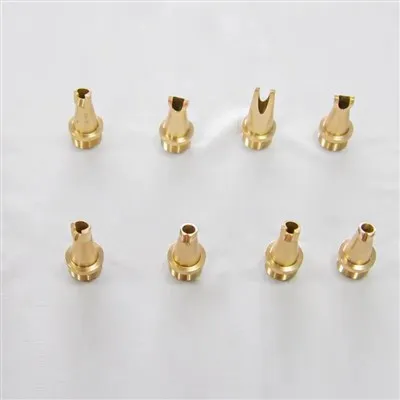
Installing a new laser cutting nozzle is a crucial task that can significantly impact the performance and efficiency of your laser cutting machine. As a trusted Laser Cutting Nozzles supplier, we understand the importance of a proper installation process. In this blog, we will guide you through the steps of installing a new laser cutting nozzle, providing you with detailed insights to ensure a smooth and successful installation.
Why a Proper Nozzle Installation Matters
Before diving into the installation process, it's essential to understand why a proper nozzle installation is so important. A well - installed nozzle ensures optimal gas flow, which is crucial for efficient cutting quality. It helps in reducing spatter, improving edge quality, and increasing the overall cutting speed. Moreover, a correct installation can prevent premature wear and tear of the nozzle, saving you both time and money in the long run.
Pre - installation Preparations
Safety First
Safety should always be your top priority when working with laser cutting equipment. Before starting the installation process, make sure you are wearing appropriate Protective Glasses. These glasses are designed to protect your eyes from the intense laser light and any potential debris that may be generated during the installation or operation of the machine.
Gather the Necessary Tools
You will need a set of basic tools for the installation. These typically include a wrench or a socket set, depending on the type of nozzle and the machine. Make sure the tools are clean and in good working condition.
Select the Right Nozzle
Selecting the correct laser cutting nozzle for your specific application is crucial. Factors such as the type of material to be cut, the thickness of the material, and the power of the laser all play a role in determining the right nozzle size and type. At our Laser Cutting Nozzles store, we offer a wide range of nozzles to suit different needs, and our team can help you choose the most appropriate one.
Inspect the New Nozzle
Before installation, carefully inspect the new nozzle for any signs of damage or defects. Check the orifice size, the surface finish, and the threading. Any irregularities could lead to poor cutting performance or even damage to the laser cutting head.
Power Off the Machine
Ensure that the laser cutting machine is completely powered off and disconnected from the power source before starting the installation. This is a critical safety measure to prevent any accidental operation of the laser during the installation process.
Step - by - Step Installation Process
Remove the Old Nozzle
- Locate the old nozzle on the laser cutting head. The nozzle is usually attached to the cutting head using a threaded connection.
- Use the appropriate wrench or socket to loosen the old nozzle in a counter - clockwise direction. Be careful not to apply too much force, as this could damage the threading on the cutting head or the nozzle itself.
- Once the old nozzle is loose, carefully remove it from the cutting head. Inspect the old nozzle for any signs of excessive wear, such as a worn - out orifice or a damaged thread. This can give you an indication of whether there were any issues with the previous installation or operation.
Clean the Cutting Head
- After removing the old nozzle, it is important to clean the mounting area on the cutting head. Use a clean, dry cloth to wipe away any debris, dust, or residues that may have accumulated in the area.
- If there is stubborn dirt or debris, you can use a mild cleaning solution. However, make sure the solution is compatible with the materials of the cutting head. After cleaning, dry the area thoroughly to prevent any moisture from causing corrosion or other problems.
Install the New Nozzle
- Take the new, inspected nozzle and carefully align it with the mounting area on the cutting head. Make sure the threading on the nozzle and the cutting head are properly aligned.
- Begin screwing the nozzle onto the cutting head by hand in a clockwise direction. This ensures that the threading starts correctly and reduces the risk of cross - threading.
- Once the nozzle is hand - tight, use the wrench or socket to tighten it further. Do not overtighten the nozzle, as this can damage the threading and cause leaks or other issues. A good rule of thumb is to tighten the nozzle until it is snug but not overly tight.
Check the Alignment
- After installing the nozzle, it is important to check its alignment. A misaligned nozzle can cause uneven gas flow and poor cutting quality.
- You can use a laser alignment tool or follow the manufacturer's guidelines to ensure that the nozzle is properly aligned with the laser beam. Make any necessary adjustments to achieve the correct alignment.
Post - installation Checks
Gas Leak Test
- After the installation, it is essential to perform a gas leak test. Turn on the gas supply to the laser cutting machine at a low pressure.
- Use a soap - water solution and apply it gently around the nozzle connection area. If there are any gas leaks, you will see bubbles forming. If a leak is detected, carefully tighten the nozzle further or check the sealing components.
Test Cutting
- Once you have confirmed that there are no gas leaks, perform a test cut on a scrap piece of material. This will allow you to evaluate the cutting quality and ensure that the nozzle is functioning properly.
- Pay attention to the edge quality, the presence of spatter, and the cutting speed. If there are any issues, such as rough edges or excessive spatter, it may indicate that the nozzle is not installed correctly or that there are other problems with the machine.
Troubleshooting Common Installation Issues
Cross - threading
If you encounter cross - threading during installation, stop immediately. Cross - threading can damage the threading on both the nozzle and the cutting head. Unscrew the nozzle carefully and realign the threads before attempting to install it again.
Poor Gas Flow
If you notice poor gas flow after installation, check for any blockages in the nozzle or the gas lines. Also, ensure that the nozzle is properly seated and tightened to prevent any gas leaks.


Uneven Cutting
Uneven cutting can be a sign of a misaligned nozzle. Check the alignment of the nozzle using the appropriate tools and make the necessary adjustments.
Contact for Purchase and Support
If you are in the market for high - quality Laser Cutting Nozzles or need assistance with installation, our team of experts is here to help. We offer a wide selection of nozzles, as well as related products such as Laser Protective Lens. Don't hesitate to contact us for any questions or to discuss your specific requirements. We look forward to partnering with you to ensure the optimal performance of your laser cutting machine.
References
- Laser Cutting Machine Manufacturer's Manuals
- Industry Standards for Laser Cutting Nozzle Installation
- Professional Journals on Laser Cutting Technology